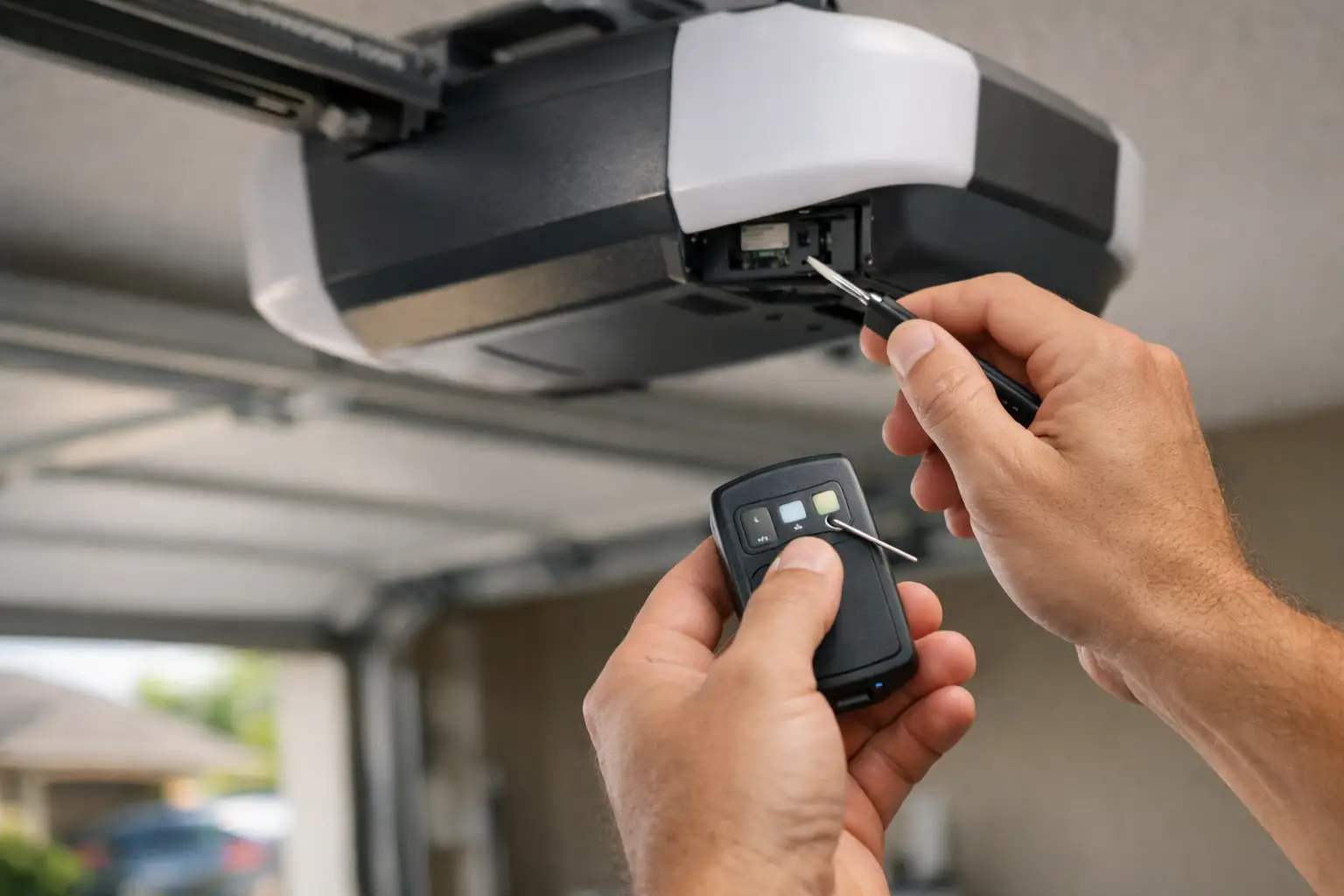
A remote that suddenly stops opening the garage can turn a normal morning into a scramble. Whether you have a new remote, replaced an opener battery, moved into a new home, or lost access after a power outage, garage door remote programming is usually straightforward when the opener and remote are compatible. The key is knowing which system you have and avoiding a few common mistakes that can erase working remotes or create a security concern.
For homeowners and small businesses, a working remote is more than a convenience. It is part of daily access, property security, and the safe operation of your garage door system. Here is how to approach programming with confidence, along with the signs that it is time to call for help.
Start With the Right Remote and Opener
Before pressing any buttons, confirm that the remote is designed to work with your specific garage door opener. The brand name alone is not always enough. Many manufacturers have used different radio frequencies, coding technologies, and programming methods over the years.
A universal remote can be a good solution, especially when replacing an older transmitter or consolidating multiple garage doors into one device. Still, universal does not mean compatible with every opener ever made. Check the remote packaging, the instruction sheet, or the opener motor unit for compatibility details.
The motor unit is the box mounted to the ceiling inside the garage. Look for its manufacturer, model number, and the color of the Learn, Program, or Smart button. That button color can help identify the opener generation and programming method. Do not guess based on the color of the garage door or the wall control. The button on the motor unit is what matters.
If the remote is old, inspect the battery before assuming it needs programming. A weak battery can make a remote appear unresponsive, work only from a short distance, or operate inconsistently. Replacing the battery is inexpensive and often solves the problem.
Garage Door Remote Programming: The Basic Process
Most modern openers use a Learn or Program button on the motor unit. When that button is pressed briefly, the opener enters a short learning mode. You then press the desired button on the remote to pair it.
The exact timing varies by manufacturer, but the general process is similar:
- Make sure the garage door is fully closed and the area around it is clear.
- Locate the Learn or Program button on the opener motor unit. It may be behind a light cover or near the antenna wire.
- Press and release the button once. A small LED may light up or blink to show the opener is ready.
- Within about 30 seconds, press and hold the button on the remote that you want to use. Release it when the opener light flashes, clicks, or the door moves.
Test the remote from outside the garage once programming is complete. Stand clear of the door while testing, especially if children, pets, vehicles, or stored items are nearby.
A brief press of the Learn button normally adds one remote. Holding that button down for several seconds can erase all programmed remotes from many opener models. That can be useful after a remote is lost or stolen, but it is frustrating if done by accident. If every remote stops working after you attempt programming, the opener may have been cleared and each remote will need to be added again.
Programming Through a Wall Control
Some newer openers allow remote setup through the wall-mounted control panel rather than the motor unit. This can be easier if the opener is difficult to reach, but the menu labels vary widely. You may see options such as Program, Device Setup, Remote, or Add Accessory.
Follow the instructions for your specific wall control rather than using a generic sequence. Programming methods can differ even between models made by the same company. If the wall control does not have a menu or program button, use the Learn button on the motor unit instead.
Why a Remote May Not Pair
When a remote will not program, the issue is not always the remote. Start by checking the easy items: fresh battery, correct remote model, and a fully powered opener. If the opener lights are off and the wall control is dead, the problem may be a tripped outlet, GFCI outlet, breaker, or opener power issue.
Distance and interference can also affect programming. Try standing close to the motor unit while pairing the remote. LED bulbs, wireless security equipment, nearby electronics, and certain vehicle accessories can sometimes interfere with remote signals. If a remote works only near the garage but not from the driveway, interference or a failing receiver may be involved.
A door that will not move after the remote appears to pair may have a separate mechanical or safety problem. Check whether the wall button operates the door. If it does, the issue is likely remote-related. If neither the wall control nor the remote moves the door, do not keep cycling the opener. The door could have a broken spring, damaged cable, obstructed safety sensor, or opener issue that needs a professional inspection.
Security Steps After a Lost Remote
A misplaced remote deserves more attention than a dead battery. If it was lost near your home, stolen from a vehicle, or left behind after a tenant or employee moved on, clear the opener’s stored codes and program only the remotes you still control.
This step removes access from the missing remote. After clearing the codes, reprogram your remotes, keypad, vehicle controls, and any compatible smart access devices. It takes a little time, but it is a sensible way to protect your home, tools, vehicles, or business inventory.
For commercial properties, be careful about handing out remotes without a simple access plan. Keep a record of who has each remote, retrieve them when staff changes occur, and clear codes when a transmitter cannot be accounted for. For busy shops, storage spaces, and small warehouses, that small bit of organization can prevent an avoidable security gap.
When Vehicle Programming Is Different
Built-in vehicle garage controls are convenient, but they do not always follow the same steps as a handheld remote. Many cars use an integrated system that first copies the signal from an existing remote and then must be synchronized with the garage opener’s Learn button.
The vehicle owner’s manual is the best source for the button sequence inside the car. In many cases, you will need a working handheld remote during setup. If you no longer have one, program a compatible handheld remote first, then use it to train the vehicle system.
Do not program a vehicle control while the car is running inside the garage. Pull into the driveway or keep the garage well ventilated. It is a small safety detail that is easy to overlook when you are focused on getting the buttons to cooperate.
When to Call a Garage Door Professional
There is no need to turn a simple remote setup into a service call. But there are situations where professional help saves time, prevents damage, and gets your access restored faster. Call for service if the opener will not enter programming mode, multiple remotes fail despite new batteries, the door reverses unexpectedly, or the wall control and remote both stop working.
You should also get help if your opener is an older model with unreliable operation, if you need to coordinate remotes for multiple doors or gates, or if the opener has been damaged by lightning, water, pests, or a power surge. Replacing an aging opener can be more cost-effective than repeatedly troubleshooting a failing receiver or outdated remote system.
Riggs Rescue AZ can help homeowners and business owners identify compatible remotes, restore access, and diagnose the bigger problem when programming is only part of the issue. Clear explanations and transparent options matter, particularly when the garage door is your main way in and out of the property.
A remote should work with a simple press, not a ritual of standing in one exact spot and hoping for the best. If yours is inconsistent, take care of it while the problem is still a small one – reliable access starts with a door system you can count on every day.

Leave a Reply